Find legacy SuiteScript
before the 2028.2 deadline does.
Scan active scripts visible to your current NetSuite role, identify migration blockers, and convert readable SuiteScript 1.0 / 2.0 / 2.x source to 2.1 with version-based priority and review flags.
5 free conversions. No credit card.
Read-only · Never writes to NetSuite · Not affiliated with Oracle
Data handling: Scan & Verify checks legacy source access temporarily in your browser, discards the source after classification, and does not send it to the AI provider. When you explicitly convert a script, its source code is sent to the SuiteMigrate backend and the configured AI provider for that conversion. SuiteMigrate does not retain the original source in its conversion database; converted results may be stored in your account for re-download. · Security & privacy details ↓
Oracle NetSuite — official migration timeline
Source: Oracle NetSuite SuiteAnswers article 1047412 — “SuiteScript 2.1 Required for All Custom Scripts in NetSuite 2028.2”
2.0 scripts aren't “working fine” — they're a silent risk. SuiteScript 2.1 runs a different engine (ES2023 vs ES5.1). Oracle documents behaviour differences that can silently change results — decimal handling, date operations, RESTlet response formats. Scripts that run under 2.1 without code changes may produce different output.
Built for the people who own the migration.
NetSuite Consultants & Partners
Managing migrations across client accounts on a deadline. Get an active-script inventory, clear migration priority, reviewable conversions, and a Migration Readiness Report for project handoff.
NetSuite Admins
Responsible for your organisation's scripts but not sure where to start. Scan active scripts and see which API versions still need migration before converting anything.
NetSuite Developers
Need to convert scripts without losing the ability to review what changed. Get SuiteScript 2.1 output with change notes, manual-review flags, and downloadable JavaScript.
Typical situations NetSuite teams describe
Built for NetSuite's reality.
Active-script scan & inventory
Scans active script records visible to your current NetSuite role. See script name, type, API version and whether a source file is attached. No NetSuite API key is required.
Gives admins and consultants a practical starting inventory before conversion work begins.
Version-based migration priority
Legacy scripts are labelled HIGH or MEDIUM priority primarily from their SuiteScript API version, while 2.1 scripts are marked current. Conversion results separately show a heuristic review score and manual-review flags.
Use the version-risk inventory to identify the oldest scripts first without presenting it as a full code-risk assessment.
Automatic source access checks
After Scan & Verify, the extension checks legacy source access in paced background batches. Each script is marked readable, protected, restricted, missing-file, or unverified. Pause or resume without using conversion quota.
Know what your team can migrate directly — and what needs an authorized source copy, a different role, or a vendor 2.1 release.
Read-only NetSuite workflow
SuiteMigrate reads script metadata and selected source files but does not create, modify, deploy, or delete anything inside NetSuite.
Converted code stays under the user's control and should be tested in NetSuite Sandbox before production deployment.
Side-by-side migration review
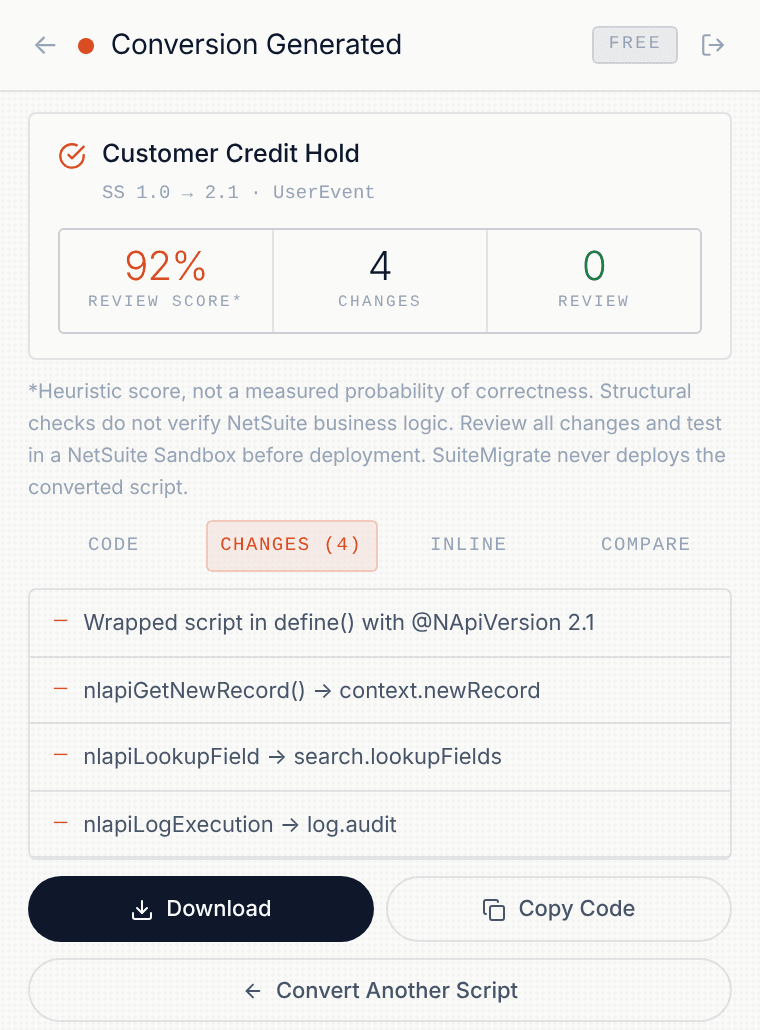
Inspect generated 2.1 code, change notes and inline review flags alongside original source while your extension session is open. Original source is not retained in extension storage.
Makes generated changes easier to inspect before sandbox testing.
Structural checks and review notes
The converter checks generated JavaScript structure before saving a successful result, returns migration notes, and highlights areas requiring developer review. This does not prove NetSuite runtime correctness.
Compare behavior carefully with original source and test in a Sandbox before deployment.
Migration Readiness Report (HTML/PDF)
Pro and Consultant users can download a categorized HTML readiness report (printable to PDF) and a spreadsheet-safe CSV inventory. Outputs reflect the last verified scan.
Share a source-access plan with stakeholders without including original source code.
Download converted JavaScript
Save converted JavaScript directly through Chrome Downloads, with filename, change summary, and testing reminders. Export errors are shown instead of silently ignored.
Keeps output portable and easy to review in an editor or source-control workflow.
Known limits
Complex search logic, custom libraries, dynamic record-type handling, and unusual coding patterns are flagged for manual review, not silently converted. Not all business-logic risks can be detected automatically. Always review output, test critical processes in NetSuite Sandbox and approve changes before deployment.
One scan. Clear source status.
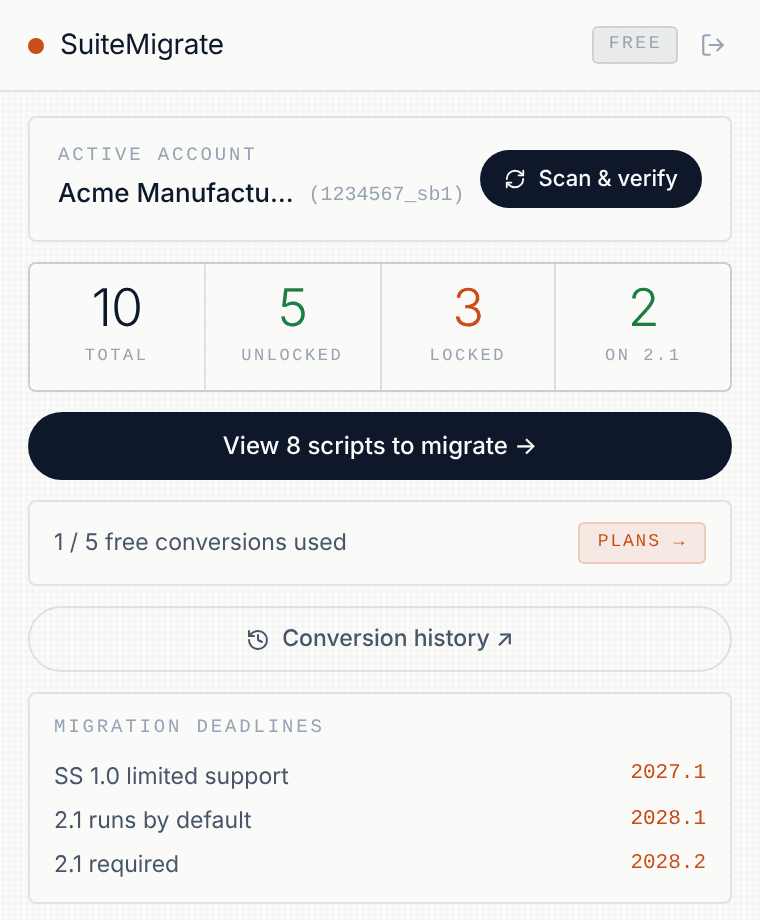
Scan the active-script inventory, then verify legacy source access in small, read-only batches. See what is readable, what is Locked or Unlocked, and what still needs checking.
Pro and Consultant include a categorized HTML readiness report and metadata-only CSV inventory. Checks use your current NetSuite role, never bypass protected source and consume no AI conversion quota.
Know what can move.
Know what is blocked.
Scan results classified under the active NetSuite role. No source code in the report.
Four steps from scan to production.
- 01
Scan — read-only inventory of active scripts
Install the extension and open it on a logged-in NetSuite tab. SuiteMigrate reads active script records visible to your current role. On the first scan Chrome asks you to allow access to NetSuite pages so the source check can keep running while you work. It never creates, modifies, deploys, or deletes data in your NetSuite account.
- 02
Verify — readable, locked, missing and unverified source
The extension checks legacy source access in background batches and classifies scripts under your current role. Filter Unlocked or Locked scripts, and export HTML or CSV reports on a paid plan.
- 03
Convert — reviewable 2.1 migration draft
Select verified readable source for AI-assisted migration. Review converted code, change notes, inline flags, and the original-versus-migrated comparison before downloading.
- 04
Test in Sandbox — then deploy to Production
Always test converted scripts in a Sandbox account before moving to Production. Upload the converted file, run your business process, and validate the output against the original. Deploy to Production only after sandbox validation passes.
Legacy source. Readable 2.1.
Explore two small, illustrative SuiteScript migration patterns. Real scripts require developer review, NetSuite Sandbox testing, and verification of business behavior.
Illustrative, hand-reviewed examples—not live SuiteMigrate outputs or a guarantee of automatic correctness. The extension produces reviewable migration drafts; it never deploys to NetSuite.
Built by a NetSuite developer who migrates scripts for clients.
SuiteMigrate was built by a NetSuite developer to solve the SuiteScript migration problem.
What changes between plans.
Active-script scanning, version-risk inventory, AI conversion, change review, review score, and JavaScript downloads are included on all plans.
| Feature | Free | Pro | Consultant |
|---|---|---|---|
| AI conversions | 5 | Unlimited | Unlimited |
| NetSuite accounts covered | Any | 1 company | Unlimited |
| Active-script scan | ✓ | ✓ | ✓ |
| Code comparison + JS download | ✓ | ✓ | ✓ |
| Source access & Locked/Unlocked filters | ✓ | ✓ | ✓ |
| Migration Readiness Report (HTML/PDF) | — | ✓ | ✓ |
| Inventory CSV export | — | ✓ | ✓ |
| Client-branded reports + priority support | — | — | ✓ |
Start free. Upgrade when you need more.
- —Active-script scan & inventory
- —Version-risk label per script
- —5 AI conversions
- —Code comparison, Changes & Inline review
- —Unlocked / Locked source filters
- —Heuristic review score
- —Migration Readiness Report requires a paid plan
- ✓Unlimited script conversions
- ✓One NetSuite account (production + sandboxes)
- ✓Migration Readiness Report + CSV export
- ✓Code comparison, Changes & Inline review
- ✓Converted JavaScript downloads
- ✓Everything in Pro
- ✓Unlimited NetSuite accounts
- ✓Client-branded Readiness Reports
- ✓Priority support
Prices in USD · Taxes added at checkout · Yearly plans are ten months' price and renew automatically · Cancel anytime
Billing & refund terms
What the extension does — and doesn't do.
What the extension reads
- —Script records via SuiteQL (/services/rest/query/v1/suiteql)
- —Legacy script source temporarily during user-initiated Scan & Verify access checks
- —Current page URL to detect the active NetSuite account ID
- —Source status and script metadata are saved locally; the scan discards source bytes
What the extension never does
- —Never creates, modifies or deletes any NetSuite data
- —Never reads or stores your NetSuite password
- —Never sends your NetSuite session token to our servers
- —Never bypasses protected or role-restricted vendor source
What is processed by our AI service
- —The script code you explicitly choose to convert
- —Processed by the SuiteMigrate conversion engine for that conversion only
- —Original source is not retained by SuiteMigrate after processing
- —Converted results may be stored in your account for re-download
Your data
- —Converted scripts are stored in your account for re-download
- —You can manage local extension history and account settings; see Privacy Policy for data removal details
- —Payment details are never entered into or stored by the extension
- —See Privacy Policy for full retention details
Common questions.
Why not just paste my script into ChatGPT?
Pasting one script is straightforward. SuiteMigrate combines version-based inventory, read-only source-access verification, Locked/Unlocked filters, AI-assisted conversion drafts, code comparison, and HTML/CSV planning exports on paid plans.
Do I need to migrate my 2.0 scripts?
Yes. Oracle's transition guidance says SuiteScript 2.0 and 2.x scripts are in scope for the 2028.2 transition. From 2028.1, 2.0/2.x server scripts run under the 2.1 runtime by default, so they should be tested for compatibility before the annotation is updated.
Can I use NetSuite's own preference to run 2.0 scripts as 2.1?
Yes. NetSuite provides account-level preferences that let you test 2.0/2.x server scripts in the 2.1 runtime. SuiteMigrate complements that testing by giving you an active-script inventory, version-based migration priority, and a reviewable conversion workflow.
What if a client or vendor script is locked or hidden?
SuiteMigrate does not bypass NetSuite or vendor source protection. A locked bundle file can still be readable, while vendor-hidden server source may be intentionally unavailable. SuiteMigrate automatically separates protected/restricted source, missing files, and unverified results so a temporary error is not mislabeled as locked. If you already have an authorized source copy, you can paste it manually; otherwise request a SuiteScript 2.1-compatible release or source from the vendor/client.
Is my code safe?
See the Security & privacy section below. The extension checks legacy source access under your current NetSuite role without uploading it during scanning. If you explicitly convert a script, that selected source is sent to the backend and AI provider. No NetSuite records are modified. See the data-handling note near the top of the page for full details.
What happens to my scripts if I cancel?
Any scripts you download are standard JavaScript files on your machine. Converted-result history stored in your SuiteMigrate account remains available while the account remains active, subject to the Terms and Privacy Policy.
Do you offer refunds?
Paid plans are coming soon and nothing is charged during the beta. When they launch, plans can be cancelled at any time from the billing portal and a 7-day refund window applies to first payments — contact us at support@canwe.tech.
I already use Oracle's SuiteScript upgrade skill. Do I still need this?
Oracle's open-source upgrade skill converts files you already have in a local project. SuiteMigrate starts from the live account: it shows which deployed scripts still run legacy code, which ones you can read under your role, and which are locked in bundles — then converts the readable ones. Use both: SuiteMigrate tells you what to run the skill on.
Does SuiteMigrate store my NetSuite credentials?
No. The extension authenticates using your existing browser session — the same session you already have open. Your NetSuite credentials are never entered into, captured by, or transmitted through SuiteMigrate.
How accurate is the AI conversion?
The conversion engine applies migration rules and AI-assisted transformation, then checks generated JavaScript structure. Its review score is a heuristic—not a guaranteed accuracy percentage—and flags cannot catch every business-logic issue. Always review and test the output in NetSuite Sandbox.
Which script types are supported?
SuiteMigrate recognizes common script types including UserEvent, Suitelet, Scheduled, Map/Reduce, ClientScript, RESTlet, Portlet, and MassUpdate. Complex or unusual patterns may be flagged for manual review.
Does it work with multiple accounts or Sandbox environments?
The extension works from the NetSuite environment currently open in your browser. Test the migration workflow in Sandbox first; access still depends on the permissions of the current NetSuite role.
What does the free plan include?
The Free plan includes inventory scanning, source-access checks, Unlocked/Locked filters and five conversion attempts that finish successfully, with review and JavaScript downloads. Pro and Consultant include unlimited conversions (fair-use 500 per 30 days), HTML/PDF readiness reports and CSV exports; Consultant adds unlimited NetSuite accounts and client-branded reports.
Find legacy scripts.
Before 2028.2 does it for you.
Scan active scripts, review the migration inventory, and start converting — 5 free conversions, no credit card.
5 free conversions · No credit card · Read-only · Not affiliated with Oracle